

Key features
Screen Magnifier transforms your Mac into a powerful magnification and focus tool. Press & hold key or use hotkeys to magnify content up to 8x, or activate Spotlight mode to highlight specific text or area while dimming distractions.
Magnification Modes
Two activation modes: ”Press & hold” for temporary magnification, or use a hotkey to toggle continuous cursor-following magnification.

Spotlight Mode
Focus on what matters. Highlight specific text, lines, or paragraphs while dimming surrounding content for distraction-free reading and working.
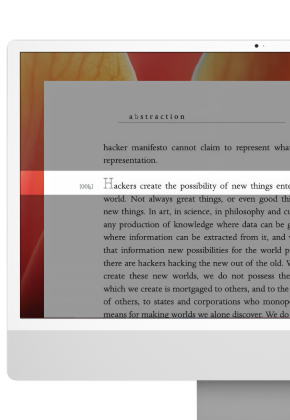
Simple Interface
Clean, minimal design that doesn't interfere with your workflow. Customizable magnifier and spotlight appearance. Dark mode support with intelligent contrast adjustment.
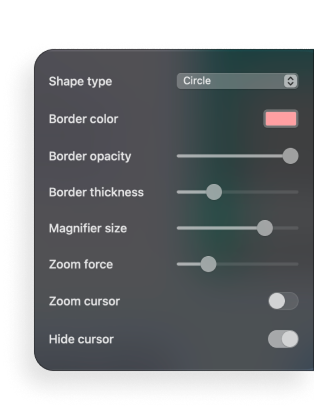
Smart Shortcuts
Toggle magnification and spotlight with customizable hotkeys. Quick mode switching (Magnify ↔ Spotlight)

Perfect for ...

Developers & Designers
Read small code comments and inspect pixel-perfect designs. Focus on specific code blocks while reviewing. Debug tiny UI elements without distraction.

Writers & Researchers
Read fine print, footnotes, and detailed documents. Highlight important passages while studying. Focus on specific paragraphs in long articles.

Students & Academics
Highlight key sentences in research papers. Read complex charts, graphs, and mathematical formulas. Reduce eye strain during long study sessions.

Vision Challenges
System menus, dialog boxes, and website fine print. Focus on important notifications or alerts. Improve reading experience across all applications.
Customer Testimonials

★★★★★
Perfect for design school! I use it to examine typography details, check alignment, and study professional designs. The 8x magnification reveals things I never noticed before.

★★★★★
I work with multiple clients' websites daily, and some have incredibly small text. This app lets me inspect every detail without missing anything. The smooth cursor tracking makes it feel natural.

★★★★★
At 58, reading academic papers with tiny fonts was becoming a real challenge. Screen Magnifier transformed my workflow. The spotlight feature is brilliant for highlighting important passages.
Frequently Asked Questions
Magnification zooms in on content for better visibility. Spotlight mode highlights specific text while dimming everything else for better focus and concentration.
Yes, both magnification and spotlight work system-wide with any app, website, or interface element.
You can quickly switch between modes, but they work independently for optimal performance.
No. Screen Magnifier is optimized for minimal resource usage and won't affect your Mac's performance.
Absolutely. Adjust spotlight size, shape, and dimming intensity to match your preferences.
Yes, you can set custom hotkeys for toggling modes, adjusting settings, and quick on/off control.